1Accessing the webmail
Go to webmail.dinao.com and sign in with the email address and password of your mailbox.
2Step by step
Open the settings
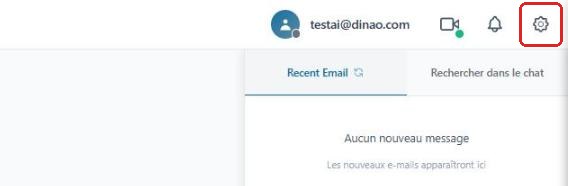
Once logged in, click the gearengrenage icon at the top right.
Open the advanced settings
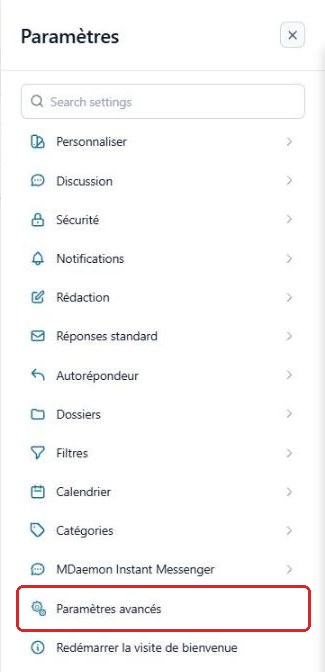
In the SettingsParamètres menu, click “Advanced Settings”Paramètres avancés.
A new “MDaemon Remote Administration”Administration de MDaemon tab opens in your browser: you are already logged in with your email account.
Open the “Autoresponder” tab
Click My AccountMon compte, then the “Autoresponder”Autorépondeur tab.

Set up the autoresponder
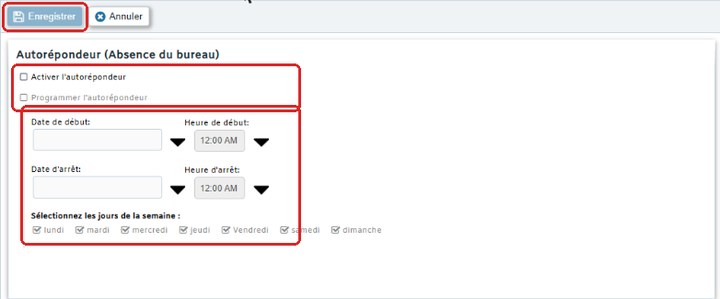
On the left: check Enable autoresponderActiver l'autorépondeur, and optionally Schedule autoresponderProgrammer l'autorépondeur with dates, times and days.
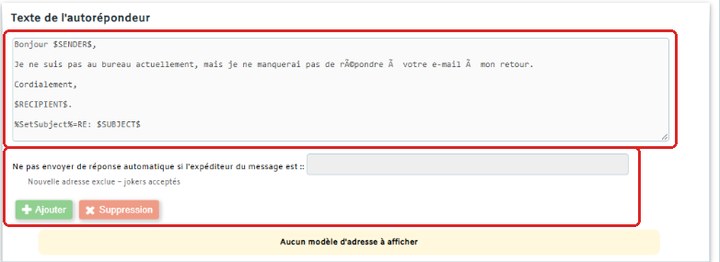
On the right: replace the suggested text with your message. The codes $SENDER$ (sender) and $SUBJECT$ (subject) are replaced automatically.
In Do not send auto response if sender isNe pas envoyer de réponse automatique si l'expéditeur est, add the addresses to exclude (wildcards accepted, for example *@newsletter.fr). Finally, click “Save”Enregistrer.
3Need help?
Open a ticket from your DINAO client area, stating the guide number and the step where you stopped.