1Accessing the webmail
Go to webmail.dinao.com and sign in with the email address and password of your mailbox.
2Step by step
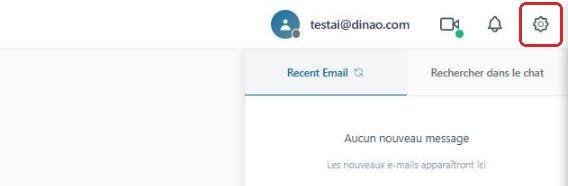
Open the settings
Once logged in, click the gearengrenage icon at the top right.
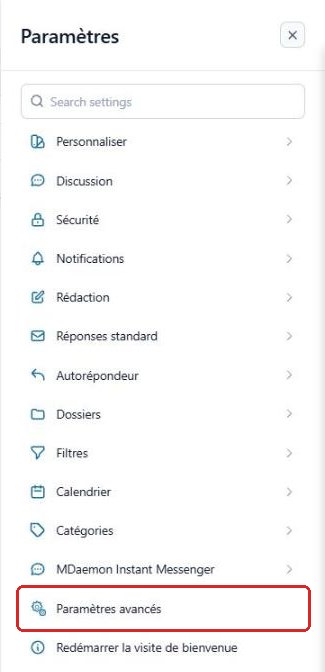
Open the advanced settings
In the SettingsParamètres menu, click “Advanced Settings”Paramètres avancés.
A new “MDaemon Remote Administration”Administration de MDaemon tab opens in your browser: you are already logged in with your email account.
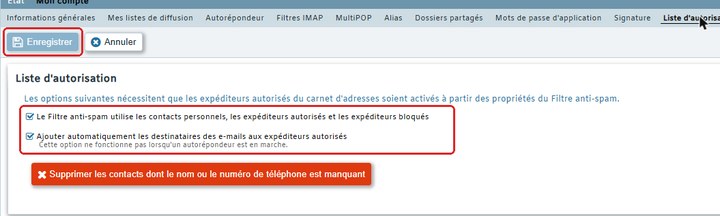
Open the “Allowed List” tab
Click My AccountMon compte, then the “Allowed List”Liste d'autorisation tab.

Adjust the options
Check Spam Filter uses personal contacts, allowed senders, and blocked sendersLe Filtre anti-spam utilise les contacts personnels, les expéditeurs autorisés et les expéditeurs bloqués, and optionally Automatically add mail recipients to allowed sendersAjouter automatiquement les destinataires des e-mails aux expéditeurs autorisés, then click “Save”Enregistrer.
3Good to know
4Need help?
Open a ticket from your DINAO client area, stating the guide number and the step where you stopped.