1Accessing the webmail
Go to webmail.dinao.com and sign in with the email address and password of your mailbox.
Do not confuse them with your DINAO client area credentials: these are two different accounts.
Good to knowThe screenshots show the webmail in French. The labels in brackets are those visible on the screenshots; in your webmail they appear in the language you have chosen (guide no. 1).
2Step by step
1
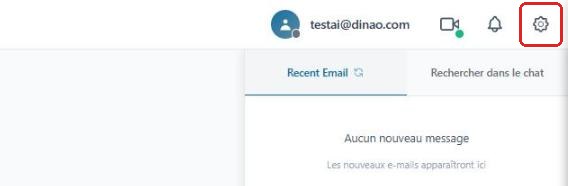
Open the settings
Once logged in, click the gearengrenage icon at the top right.
2
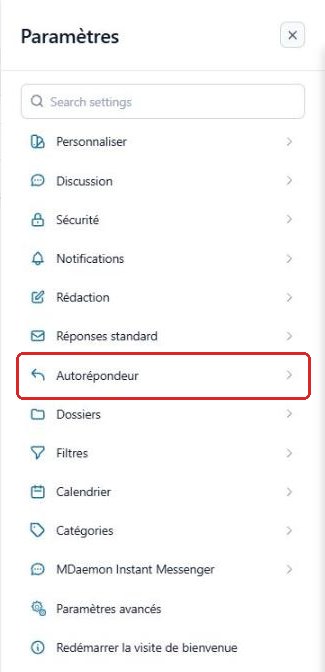
Open the “Autoresponder” section
In the SettingsParamètres menu, select “Autoresponder”Autorépondeur.
3
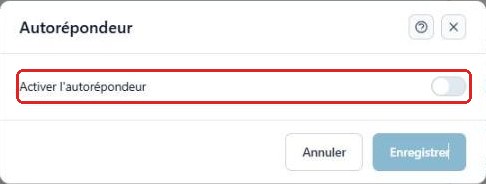
Enable the autoresponder
Turn on the “Enable autoresponder”Activer l'autorépondeur switch.
4
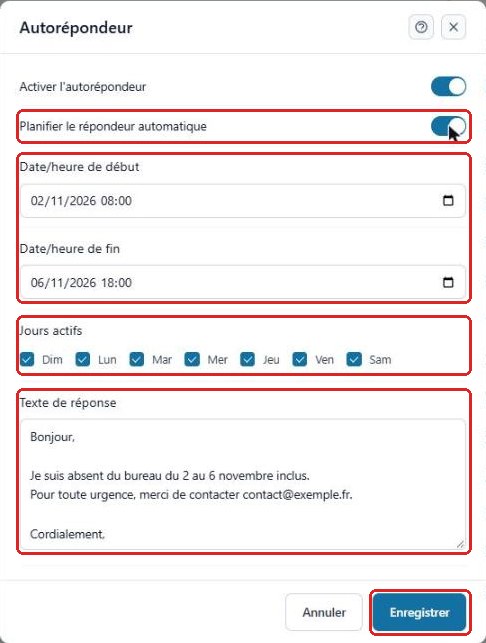
Schedule and write the reply
To have it turn on and off by itself, enable Schedule autoresponderPlanifier le répondeur automatique and enter the start and end dates and times, as well as the active days.
Then write your Reply textTexte de réponse and click “Save”Enregistrer.
Without a schedule, remember to disable the autoresponder when you return.
3Need help?
Open a ticket from your DINAO client area, stating the guide number and the step where you stopped.