1Accessing the webmail
Go to webmail.dinao.com and sign in with the email address and password of your mailbox.
Do not confuse them with your DINAO client area credentials: these are two different accounts.
Good to knowThe screenshots show the webmail in French. The labels in brackets are those visible on the screenshots; in your webmail they appear in the language you have chosen (guide no. 1).
2Step by step
1
From your mailbox
In the email view, the “% used”% utilisés bar above the message list shows at all times how full your mailbox is.

2
Open the settings
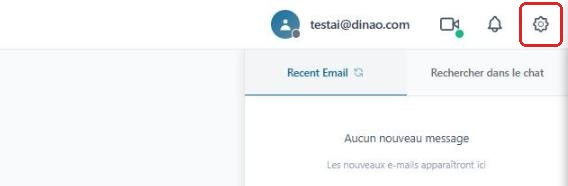
Once logged in, click the gearengrenage icon at the top right.
3
Open the advanced settings
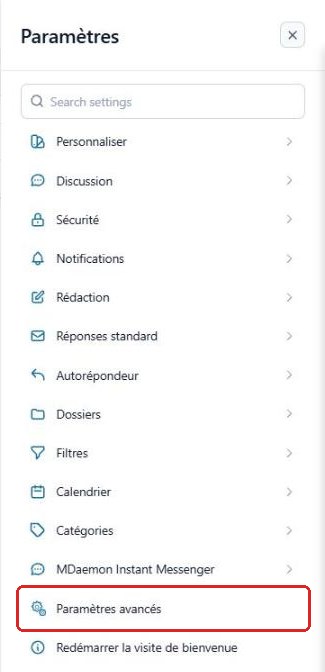
In the SettingsParamètres menu, click “Advanced Settings”Paramètres avancés.
A new “MDaemon Remote Administration”Administration de MDaemon tab opens in your browser: you are already logged in with your email account.
4
Read the statistics
The home page (Status › StatisticsÉtat › Statistiques) shows the number of messages and the space used out of the maximum allowed.

3Good to know
Mailbox almost full? Empty the Trash and the Spam folder, delete messages with large attachments, or contact DINAO to increase your quota.
4Need help?
Open a ticket from your DINAO client area, stating the guide number and the step where you stopped.